Introduction
Cybersecurity has changed significantly in recent years. Traditional security models were designed around the idea that everything inside the corporate network could be trusted. However, modern organizations now operate with a combination of cloud services, remote users, mobile devices, and internet-based applications.
Today, users can access company resources from anywhere, and many critical business applications are hosted in the cloud. Because of this change, relying only on a traditional firewall is no longer enough to provide complete protection.
This is where the Zero Trust security model becomes important.
The main principle of Zero Trust is:
“Never trust, always verify.”
Instead of automatically trusting users or devices based on their network location, every access request must be continuously verified based on identity, device security, and security policies.
Why We Started Looking at Cloudflare Zero Trust
Our organization already uses several security technologies, including a firewall, Microsoft 365, cloud platforms, and other infrastructure solutions. However, we wanted to improve our security approach by adding more identity-based and cloud-based protection.
Modern security challenges include:
- Phishing attacks
- Stolen user credentials
- Malicious websites
- Unauthorized access attempts
- Remote user security risks
- Data leakage risks
To address these challenges, we started exploring Cloudflare Zero Trust as an additional security layer for our organization.
Cloudflare Zero Trust helps organizations control access, secure internet traffic, protect users, and gain better visibility into security events.
Essential Cloudflare Zero Trust Security Features
1. Identity-Based Access Control with Cloudflare Access
One of the most important parts of Zero Trust security is verifying user identity before allowing access to applications.
With Cloudflare Access, organizations can protect internal applications by requiring users to authenticate before accessing resources.
Instead of:
User → Application → Access Granted
The process becomes:
User → Cloudflare Access → Identity Verification → MFA Check → Application Access
This approach ensures that only authorized users can access business resources.
Cloudflare Access can also integrate with identity providers such as Microsoft Entra ID, allowing organizations to use existing user accounts and authentication policies.
2. Secure Internet Access with Cloudflare Gateway
Employees spend a large amount of time accessing internet resources, and many security incidents start from malicious websites or unsafe links.
Cloudflare Gateway provides secure internet filtering by analyzing DNS and web traffic.
Important security capabilities include:
- Blocking malicious domains
- Preventing phishing access
- Filtering inappropriate or risky categories
- Improving visibility of user internet activity
Instead of allowing users to directly connect to every website, internet requests can be inspected and controlled through security policies.
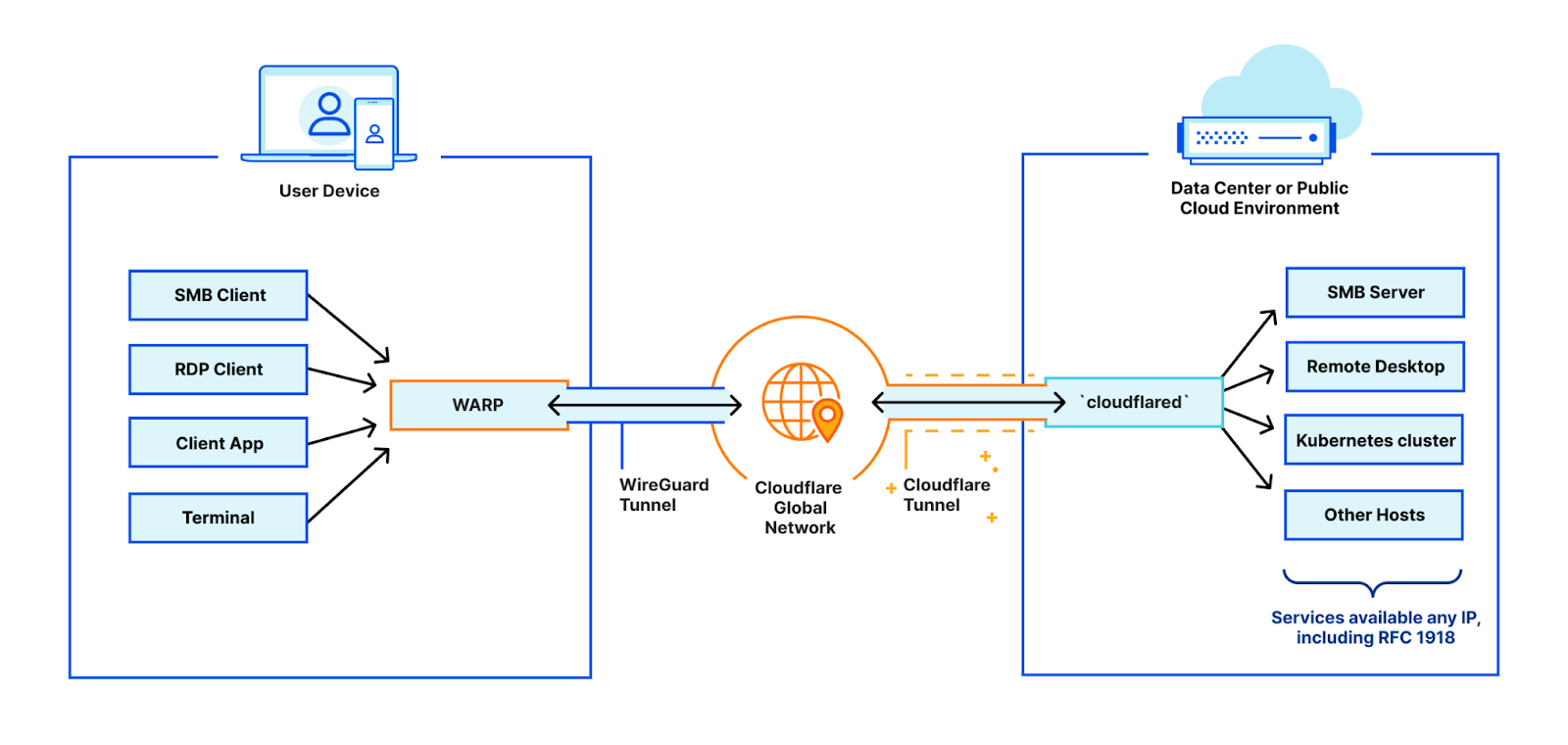
3. Protecting Devices with Cloudflare WARP
Remote work and mobile devices have changed the traditional network boundary.
A user working outside the office may not be protected by the corporate firewall. Cloudflare WARP extends security protection to user devices by creating a secure connection between the device and Cloudflare Zero Trust.
Benefits include:
- Secure user internet traffic
- Consistent security policies outside the office
- Device-based security controls
- Better visibility of user connections
This helps organizations protect users wherever they are working.
4. Security Visibility and Logging
Security without visibility is difficult to manage.
Cloudflare Zero Trust provides security logs and reports that help administrators understand:
- User activity
- Blocked requests
- Security threats
- Access attempts
- Internet traffic patterns
These logs are important for security monitoring and investigation when incidents occur.
Integration with Microsoft 365 and Cloud Services
Many organizations today depend heavily on cloud services such as Microsoft 365, Azure, and other SaaS platforms.
By combining Cloudflare Zero Trust with Microsoft Entra ID, organizations can create a stronger identity-based security model.
Example security flow:
User Device
↓
Cloudflare Zero Trust
↓
Microsoft Entra ID Authentication
↓
Multi-Factor Authentication
↓
Application Access
This approach improves security by ensuring that access decisions are based on identity and security conditions rather than only network location.
Zero Trust Implementation Approach
Implementing Zero Trust is not a one-day project. It should be introduced gradually.
Phase 1: Visibility
- Enable Cloudflare Zero Trust services
- Monitor traffic and security events
- Understand user behavior
Phase 2: Protection
- Apply DNS filtering policies
- Block malicious websites
- Protect user internet access
Phase 3: Identity Security
- Integrate with Microsoft Entra ID
- Enable MFA requirements
- Protect internal applications
Phase 4: Advanced Security
- Apply device posture checks
- Implement data protection policies
- Continuously improve security controls
Conclusion
Zero Trust security is becoming an essential approach for modern organizations. The traditional security model based only on network boundaries is no longer enough.
By implementing Cloudflare Zero Trust together with existing security solutions, organizations can improve identity protection, secure internet access, and gain better visibility into security activities.
For organizations moving toward cloud adoption, Zero Trust provides an important foundation for building a more secure and flexible IT environment.
Security is not only about protecting the network anymore. It is about protecting users, devices, applications, and data wherever they exist.