Introduction
Securing a cloud web server is important when the server is publicly accessible over the Internet. Opening HTTP and HTTPS directly to the Internet can expose the server to unwanted traffic, automated bots, scanning, and different types of web attacks.
One effective approach is to place Cloudflare in front of the web server and restrict direct access to the origin server using an AWS Security Group.
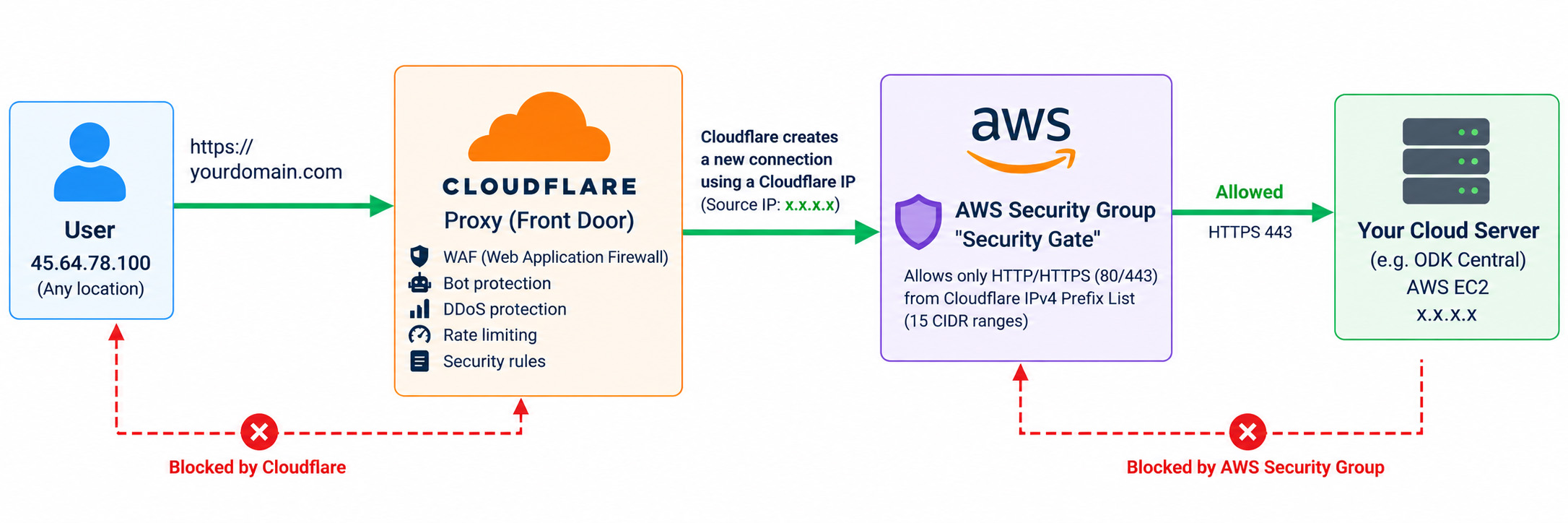
In this setup, Cloudflare acts as the front door, receiving and filtering web traffic before forwarding approved requests to AWS. The AWS Security Group acts as a second security gate, allowing HTTP and HTTPS connections only from trusted Cloudflare IP ranges.
This article explains how these two security layers work together to provide simple and more secure architecture for a cloud-hosted web server.
Traditional Direct Web Server Access
Internet User → AWS Public IP → Security Group (80/443: 0.0.0.0/0) → Web Server
Then explain that 0.0.0.0/0 means those ports accept connection attempts from any IPv4 address, subject to the rest of the server/network configuration.
The important message is that anyone on the Internet can attempt to establish connections to those public web ports. This doesn’t automatically mean the server is insecure, but it increases direct exposure of the origin.
Cloudflare Proxy as the Front Door
User → Cloudflare Proxy 🟠 → Cloud Server
Explain that when the DNS record is Proxied (orange cloud), visitors connect to Cloudflare rather than directly to the origin through that hostname.
Protecting the AWS Origin with a Cloudflare IPv4 Prefix List
The AWS Security Group can be configured as follows:
HTTP 80 → Cloudflare IPv4 ranges only
HTTPS 443 → Cloudflare IPv4 ranges only
Therefore:
Cloudflare IP → AWS → ✅ Allowed
Other Internet IP → AWS → ❌ Blocked
What Happens to the User Connection
Use your example:
User IP: 45.64.78.100 → Cloudflare Proxy → Cloudflare evaluates the request →Request allowed → Cloudflare creates a separate connection to the origin using a Cloudflare source IP → Cloudflare IP (x.x.x.x) → AWS Security Group → Web Server
Why Cloudflare Proxy and the AWS Prefix List Work Together
This section should emphasize that they perform different jobs:
| Security layer | Main purpose |
|---|---|
| Cloudflare Proxy | Inspects/protects web traffic before it reaches the origin |
| Cloudflare WAF | Applies web application security rules |
| AWS Security Group | Controls network access to the EC2 instance |
| Cloudflare IPv4 Prefix List | Defines which Cloudflare source networks the SG should allow |
Cloudflare protects the front door, while the AWS Security Group protects the origin server.
Preventing Direct Origin Access
Suppose the server’s public IP is:
x.x.x.x
An attacker tries:
Attacker → https://x.x.x.x → AWS Security Group
Because the attacker’s source IP isn’t in the Cloudflare prefix list:
Attacker IP → ❌ Not Cloudflare → BLOCKED
Whereas:
User → Cloudflare → Cloudflare IP → ✅ Prefix List → Web Server
Conclusion
Finish with something simple:
Using Cloudflare together with AWS Security Groups provides multiple layers of protection for a public cloud web server. Cloudflare receives and filters web requests at the front end, while the AWS Security Group restricts direct access to the origin server.
By allowing HTTP and HTTPS only from Cloudflare’s IP ranges, the origin server can reject direct web connections from other Internet addresses. This creates a simple layered security architecture that reduces direct exposure of the cloud web server.
Source Link;
Cloudflare IP addresses · Cloudflare Fundamentals docs
Protect your origin server · Cloudflare Fundamentals docs
Optimize AWS infrastructure management with prefix lists – Amazon Virtual Private Cloud