When configuring a VPN on FortiGate SSL VPN, one of the most important design choices is deciding between Split Tunnel mode and Full Tunnel mode. Both options control how user traffic is routed between the remote client and the corporate network, but they behave in very different ways.
What is Full Tunnel Mode?
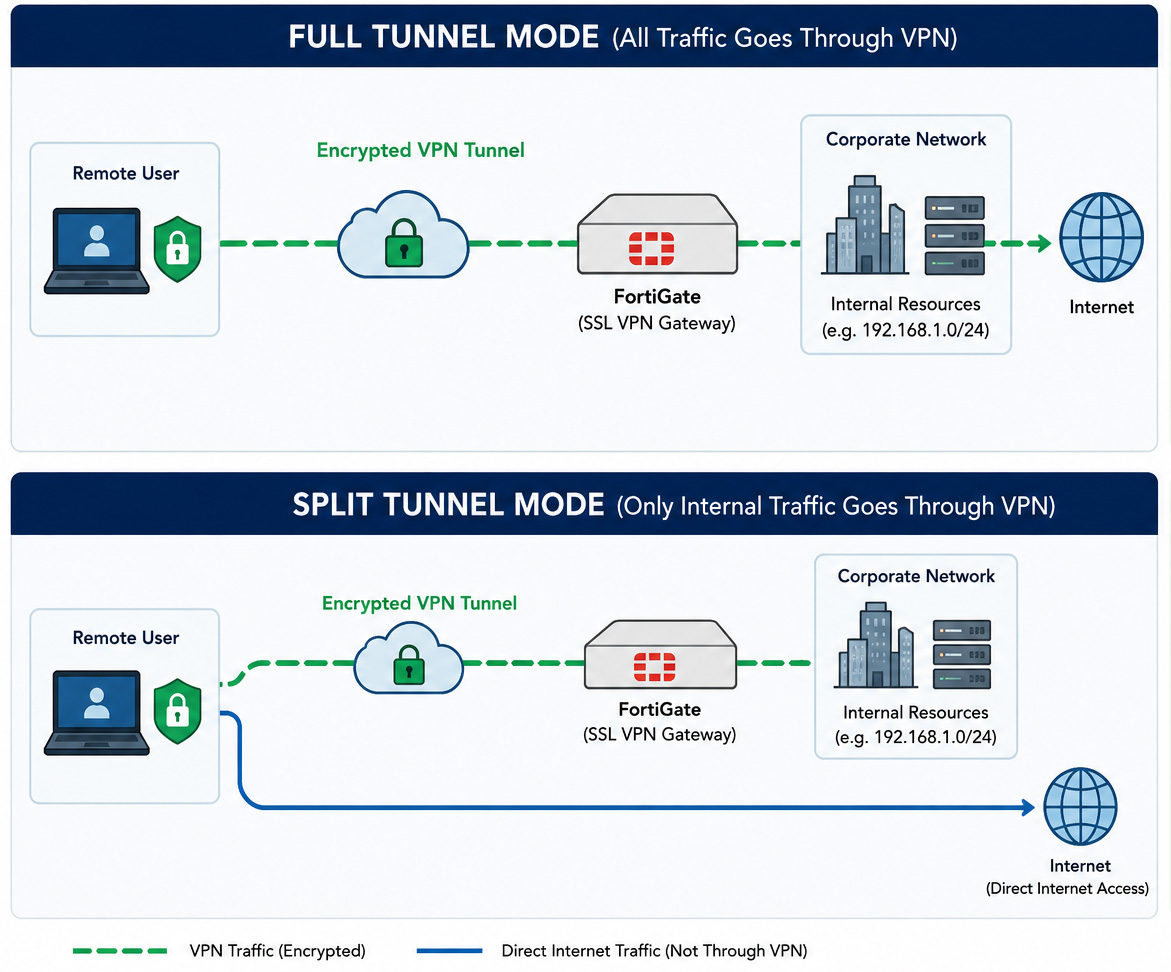
In Full Tunnel mode, all internet traffic from the remote user is routed through the VPN tunnel to the corporate network.
This means:
- All web browsing (Google, YouTube, email, etc.) goes through the office firewall
- Internal and external traffic both pass through FortiGate
- The company can monitor, filter, and log all user traffic
How it works in FortiGate SSL VPN
When Full Tunnel mode is enabled, the FortiGate device pushes a default route (0.0.0.0/0) to the client. This forces all traffic to go through the VPN tunnel instead of the local internet connection.
Advantages
- Strong security and centralized control
- Easier to enforce web filtering and policies
- Better visibility of user activity
Disadvantages
- Higher bandwidth usage on the VPN server
- Slower internet speed for users
- Requires strong firewall and internet capacity at the office
What is Split Tunnel Mode?
In Split Tunnel mode, only specific traffic is sent through the VPN tunnel, while the rest of the traffic goes directly to the internet from the user’s local network.
Typically:
- Office resources (internal servers, file shares, applications) go through VPN
- Internet traffic (Google, YouTube, etc.) uses local ISP connection
How it works in FortiGate SSL VPN
In FortiGate, split tunneling is configured through the SSL-VPN portal. You define which internal networks (for example 192.168.0.0/24) should be routed through the VPN. Only that traffic is encrypted and sent to the corporate network.
Advantages
- Faster internet speed for users
- Reduced load on FortiGate firewall
- Lower bandwidth usage
- Better user experience for remote workers
Disadvantages
- Less control over internet browsing
- Security risks if user device is not well protected
- Some traffic bypasses corporate security policies
Key Difference Between Split Tunnel and Full Tunnel
The main difference is where user internet traffic goes:
- Full Tunnel: All traffic goes through the corporate network
- Split Tunnel: Only internal traffic goes through VPN, internet stays local
Conclusion
In FortiGate SSL VPN, both Split Tunnel and Full Tunnel modes are powerful options, but they serve different purposes. Full Tunnel focuses on security and centralized control, while Split Tunnel focuses on performance and efficiency.