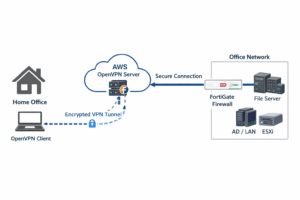
Step 1: Launch EC2 Instance
Step 2: Assign Elastic Public IP Address
Step 3: Configure Security Group on Inbound Rule
| Type | Protocol | Port | Source |
|---|---|---|---|
| SSH | TCP | 22 | Your IP |
| Custom UDP | UDP | 1024-65535 | 0.0.0.0/0 |
| Custom TCP | TCP | 1024-65535 | 0.0.0.0/0 |
Step 4: Download Outline Manager (https://getoutline.org/)
Step 5: Install on your OS
Step 6: Login with SSH to your VM
Step 7: Run Following Command line
sudo apt update
sudo apt install docker.io -y
sudo systemctl enable docker
sudo systemctl start docker
Step 8: Copy from run command from outline manager on your OS
Step 9: Copy Highlight command and paste your Outline Manager
Remark; This VPN server setup process is designed to restrict access to services based on geographic regions.